
Most Useful Computer Shortcut Keys for Students – MS Word, Excel, PowerPoint & General Shortcuts
Learn the most useful keyboard shortcuts for MS Word, Excel, PowerPoint and general computer use. A simple student-friendly shortcut guide for faster typing, editing, calculations, presentations and everyday computer work.
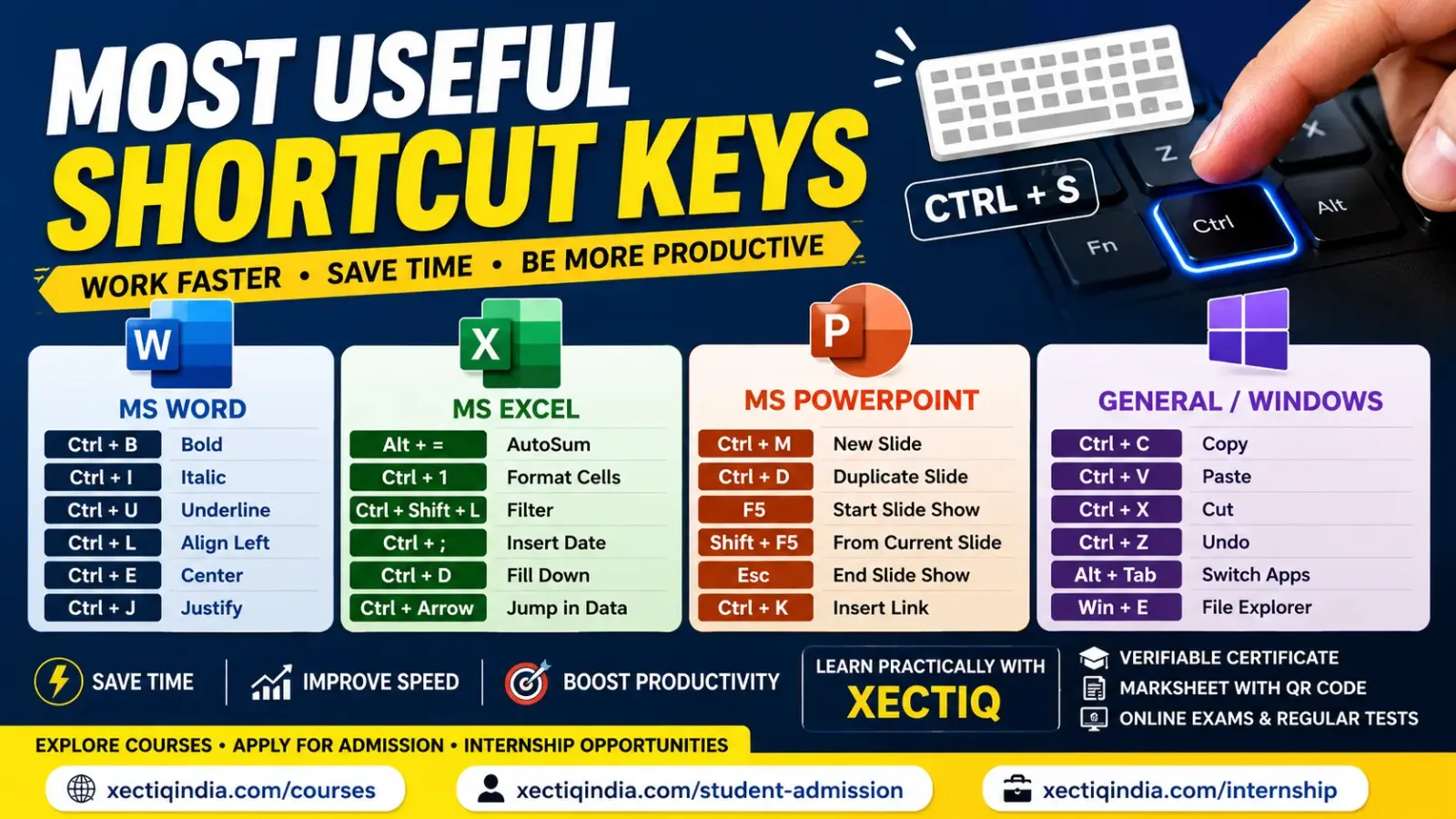
Computer use karte waqt har kaam mouse se karna possible hai, lekin keyboard shortcuts aapki speed ko significantly improve kar sakte hain.
Chahe aap student ho, office work karte ho, computer course seekh rahe ho, Excel mein data maintain karte ho ya PowerPoint presentation banate ho — kuch important shortcut keys yaad hona daily work ko faster, easier and more efficient bana deta hai.
Is guide mein hum General Computer, MS Word, MS Excel aur MS PowerPoint ke sabse commonly used shortcuts simple examples ke saath dekhenge.
Saare shortcuts ek din mein memorize karne ki zarurat nahi hai. Pehle 10–15 commonly used shortcuts practice karo. Daily use se naturally yaad ho jayenge.
Why Should Students Learn Keyboard Shortcuts?
Keyboard shortcuts sirf advanced computer users ke liye nahi hote. Beginners ko bhi inka use start karna chahiye.
- Mouse par dependency kam hoti hai.
- Typing aur document editing faster hoti hai.
- Excel data entry mein time save hota hai.
- Presentation editing quicker hoti hai.
- Office work more professional feel hota hai.
- Productivity aur confidence improve hota hai.
Mouse se kaam karna galat nahi hai, but mouse + keyboard shortcuts together use karna usually fastest approach hota hai.
1. Most Useful General Computer Shortcuts
Ye shortcuts Word, Excel, PowerPoint, browsers aur many other applications mein commonly useful hote hain.
| Shortcut | Action | Use |
|---|---|---|
| Ctrl + C | Copy | Selected text, file or object copy karna |
| Ctrl + X | Cut | Selected content ko move karne ke liye |
| Ctrl + V | Paste | Copied/cut content paste karna |
| Ctrl + Z | Undo | Last action ko reverse karna |
| Ctrl + Y | Redo | Undo ki hui action ko restore karna |
| Ctrl + A | Select All | Saara text/data select karna |
| Ctrl + S | Save | Current file save karna |
| Ctrl + P | Print window open karna | |
| Ctrl + F | Find | Text ya value search karna |
| Ctrl + N | New | New document/window create karna |
| Ctrl + O | Open | Existing file open karna |
| Alt + Tab | Switch Apps | Open applications ke beech switch karna |
| Windows + D | Show Desktop | Desktop quickly show/hide karna |
| Windows + E | File Explorer | File Explorer open karna |
| Windows + L | Lock PC | Computer quickly lock karna |
2. Most Used Shortcut Keys in MS Word
MS Word mein shortcuts formatting, alignment, editing aur document creation ko considerably faster bana dete hain.
| Shortcut | Action | Example Use |
|---|---|---|
| Ctrl + B | Bold | Important text bold karna |
| Ctrl + I | Italic | Text italic karna |
| Ctrl + U | Underline | Selected text underline karna |
| Ctrl + L | Align Left | Paragraph left align karna |
| Ctrl + E | Center | Heading center karna |
| Ctrl + R | Align Right | Paragraph right align karna |
| Ctrl + J | Justify | Paragraph ko both sides align karna |
| Ctrl + H | Find & Replace | Repeated word replace karna |
| Ctrl + K | Insert Hyperlink | Website/email link insert karna |
| Ctrl + Enter | Page Break | New page start karna |
| Ctrl + Shift + > | Increase Font Size | Selected text ka font larger karna |
| Ctrl + Shift + < | Decrease Font Size | Selected text ka font smaller karna |
| F7 | Spelling & Grammar | Document spelling check karna |
3. Most Used Shortcut Keys in MS Excel
Excel mein shortcuts ka actual benefit tab samajh aata hai jab aap large worksheets aur regular data entry ke saath work karte ho.
| Shortcut | Action | Use |
|---|---|---|
| F2 | Edit Active Cell | Cell content quickly edit karna |
| Alt + = | AutoSum | SUM formula quickly insert karna |
| Ctrl + 1 | Format Cells | Number, border, alignment etc. format karna |
| Ctrl + Shift + L | Toggle Filter | Data filter enable/disable karna |
| Ctrl + ; | Current Date | Current date cell mein insert karna |
| Ctrl + Shift + : | Current Time | Current time enter karna |
| Ctrl + Arrow Key | Jump Through Data | Data region ke edge par quickly move karna |
| Ctrl + Space | Select Column | Entire current column select karna |
| Shift + Space | Select Row | Entire current row select karna |
| Ctrl + D | Fill Down | Upper cell content/formula downward copy karna |
| Ctrl + R | Fill Right | Left cell content/formula right side copy karna |
| Ctrl + ` | Show Formulas | Formula results ki jagah formulas display karna |
| F4 | Repeat / Reference Toggle | Formula edit karte waqt relative/absolute references switch karna |
Total calculate karne ke liye cell select karke Alt + = press karo. Excel automatically nearby numeric range detect karke SUM formula suggest kar sakta hai.
4. Most Used Shortcut Keys in MS PowerPoint
PowerPoint shortcuts slides create, duplicate, format aur present karne mein kaafi useful hote hain.
| Shortcut | Action | Use |
|---|---|---|
| Ctrl + M | New Slide | Presentation mein new slide add karna |
| Ctrl + D | Duplicate | Selected slide/object duplicate karna |
| F5 | Start Slide Show | Presentation first slide se start karna |
| Shift + F5 | Present Current Slide | Current slide se slideshow start karna |
| Esc | End Slide Show | Presentation mode exit karna |
| Ctrl + G | Group Objects | Multiple selected objects group karna |
| Ctrl + Shift + G | Ungroup | Grouped objects separate karna |
| Ctrl + K | Hyperlink | Link add karna |
| Ctrl + B | Bold | Text bold karna |
| Ctrl + A | Select All | Current context mein all objects/text select karna |
5. Useful Web Browser Shortcuts
| Shortcut | Action |
|---|---|
| Ctrl + T | Open new tab |
| Ctrl + W | Close current tab |
| Ctrl + Shift + T | Reopen recently closed tab |
| Ctrl + L | Select address bar |
| Ctrl + R | Refresh page |
| Ctrl + + | Zoom in |
| Ctrl + - | Zoom out |
| Ctrl + 0 | Reset zoom |
Top 10 Shortcut Keys Every Beginner Should Memorise First
- Ctrl + C — Copy
- Ctrl + V — Paste
- Ctrl + X — Cut
- Ctrl + Z — Undo
- Ctrl + S — Save
- Ctrl + A — Select All
- Ctrl + F — Find
- Alt + Tab — Switch Applications
- Ctrl + P — Print
- Windows + E — File Explorer
Uske baad Word, Excel aur PowerPoint-specific shortcuts gradually add karo.
How to Practice Shortcut Keys?
Shortcut keys ko sirf read karne se yaad nahi rahenge. Inhe practical task ke through use karna better approach hai.
Ek one-page letter type karo. Bold, italic, underline, alignment, copy-paste, find-replace aur page break shortcut use karo.
20 students ki marksheet banao. AutoSum, formatting, row/column selection, date entry aur filter shortcuts practice karo.
5-slide presentation banao. New slide, duplicate slide, hyperlink aur slideshow shortcuts use karo.
Common Mistakes While Learning Shortcuts
- Ek saath 100 shortcut keys memorize karna.
- Shortcut read karna but practical use na karna.
- Mouse ko completely avoid karne ki koshish karna.
- Different applications mein same shortcut ka different behaviour ignore karna.
- Shortcut press karne se pehle current selection/context check na karna.
Want to Learn MS Office Practically?
Keyboard shortcuts tab sabse useful bante hain jab aap MS Word, Excel, PowerPoint aur computer fundamentals ko practical assignments ke saath learn karte ho.
Available XectiQ programmes mein Computer Fundamentals, MS Office, Excel, accounting, programming aur other practical computer skills explore kar sakte hain.
Depending on the programme and Centre workflow, students can benefit from structured learning, regular tests, online examinations, Student Panel access and digitally verifiable academic credentials.
Frequently Asked Questions
What are the most important computer shortcut keys?
Ctrl+C, Ctrl+V, Ctrl+X, Ctrl+Z, Ctrl+S, Ctrl+A, Ctrl+F and Alt+Tab are among the most useful shortcuts for beginners.
What is Ctrl+B used for in MS Word?
Ctrl+B toggles bold formatting for selected text or text you type next.
What is Alt+= used for in Excel?
Alt+= is commonly used to quickly insert an AutoSum formula.
What is F5 used for in PowerPoint?
F5 starts the slideshow from the beginning of the presentation. Shift+F5 starts it from the currently selected slide.
Is learning keyboard shortcuts necessary?
They are not mandatory, but learning commonly used shortcuts can make computer work faster and more efficient.
How can I remember shortcut keys easily?
Use a small set of shortcuts repeatedly in practical tasks. Regular use is more effective than memorising a long list.
Conclusion
Keyboard shortcuts are small skills that can create a big improvement in everyday computer productivity.
Beginners ko sabse pehle common shortcuts jaise Copy, Paste, Undo, Save, Find and Select All master karne chahiye.
Uske baad MS Word formatting shortcuts, Excel data-management shortcuts aur PowerPoint presentation shortcuts gradually practice karein.
Shortcut + Practice + Regular Use = Faster Computer Work
Continue reading
Related articles
More practical insights from the XectiQ learning network.

Why Students Should Learn AI: Benefits, Skills, Career Opportunities & How to Start
Learn how Artificial Intelligence can help students in studies, research, coding, creativity, productivity and future careers. Understand how to learn AI responsibly and explore practical AI and computer courses with XectiQ.
 Featured
Which BCA Specialization Should You Choose? AI, Data Science, Cyber Security, Cloud or Full Stack – Complete Student Guide
Confused about which BCA specialization to choose? Compare AI & Machine Learning, Data Science, Cyber Security, Cloud Computing, Full Stack Development and BCA General with practical guidance based on your interests, skills and career goals.
 Featured
JAC Board Class 12 Computer Science (C++) MCQ with Answers – Last 3 Years PYQ 2024, 2025 & 2026
Prepare for JAC Board Class 12 Computer Science with important C++ MCQs based on previous-year question patterns from 2024, 2025 and 2026. Practice objective questions with correct answers and short explanations.
Build practical skills
Turn learning into real capability.
Explore courses, internships and authorised XectiQ Centres.